Appearance
Built-in Presets
The following presets are created on first import. Each preset overrides only the settings relevant to its purpose and inherits the rest from your environment at the time it is created.
| Preset | Purpose |
|---|---|
| UI | 2D view + Rect tool. Turns off lighting, Fog, post effects, and Gizmos to check flat, accurate UI colors. |
| Modeling | 3D perspective + Move tool. Grid and snap on, shaded wireframe. |
| Lighting | 3D view + lighting, Skybox, Fog, and effects on, Gizmos hidden. |
| Overdraw | Overdraw draw mode. Effects and Gizmos off for performance diagnosis. |
| Capture | A clean view for screenshots. Gizmos, grid, and selection outline off, effects on. |
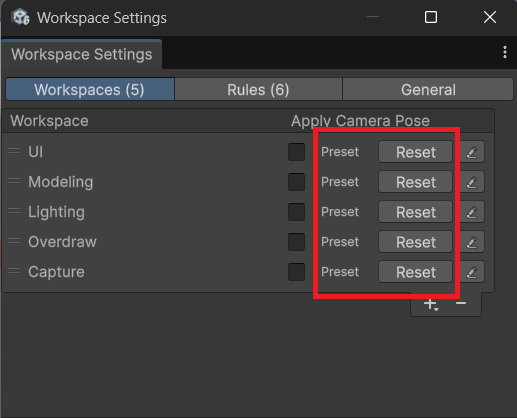
Presets start with Apply Camera Pose turned off, so switching to a preset changes only the settings and leaves the camera where it is. Like any other Workspace, you can turn the option on for a preset on the Workspaces tab. Reset turns it off again along with the other preset defaults.
Modifying and Restoring
You can freely modify, rename, or delete these presets.
On the Workspaces tab of the Workspace Settings window, a Workspace whose name matches a built-in preset is marked Preset.
- Reset returns it to the preset defaults.
- + → Add Preset brings back a preset you deleted.