Appearance
Export / Import
Workspaces and Isolate auto-switch rules can each be exported to and imported from JSON files. Use this for backups or to share your setup between projects and teammates.
Both are in the Workspace Settings window, which you open from the settings button (⚙) on the overlay.
| What | Where |
|---|---|
| Workspaces | Bottom of the Workspaces tab |
| Isolate auto-switch rules | Bottom of the Rules tab |
Workspaces
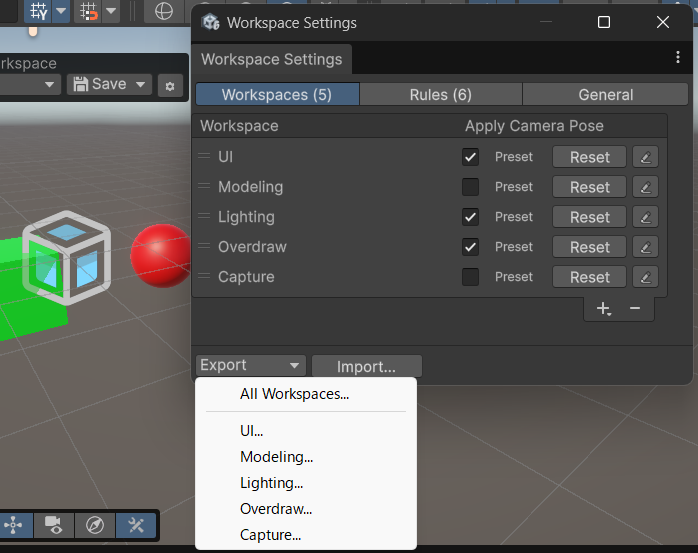
- Export writes a single Workspace, or all Workspaces, to a JSON file.
- Import... loads a JSON file and restores the Workspaces as they were at export time. If a Workspace with the same name already exists, you can choose Overwrite, Skip, or Rename.
Isolate Auto-Switch Rules
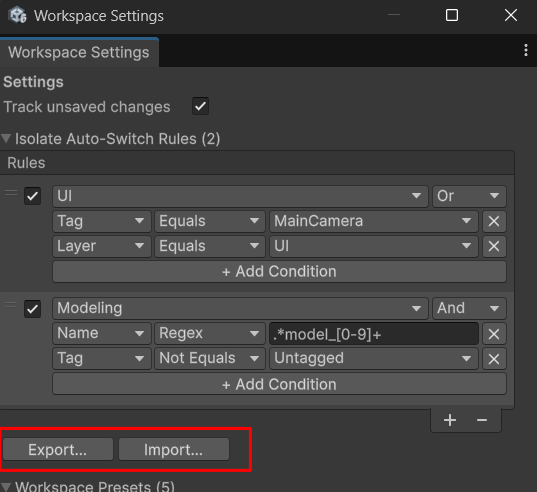
- Export... saves the rules to a JSON file at any location.
- Import... loads a saved JSON file. You can choose to append to or replace the existing rules.